
WordPressto HTMLConverter
A SEO utility to convert WordPress XML (WXR) and SQL into SEO-friendly static HTML,Markdown,or JSON without losing structure and SEO quality. An independent app that works without WordPress. Run it on your Windows system.
- Support conversion of WordPress XML (WXR) and SQL
- Export data in Markdown,HTML,and JSON
- Support 8 color schemes,7 themes,index page,SEO meta,and optional image download
- 6-step wizard,filters,URL-based folder structure
What Is KWT WordPress to HTML Converter?
KWT WordPress to HTML Converter is designed for Windows users who want a fast and easy way to convert WordPress (XML WXR and SQL) files into static HTML,JSON or Markdown. During migration,the application keeps all components intact including meta tags,canonical URLs,and graphs so that migrated or static sites remain crawlable and indexable. It is an excellent app for SEO experts and developers for generating static sites,WordPress-to-static migrations,and client deliverables without WordPress.
In brief:
- Purpose:Convert WordPress WXR and SQL into static HTML,JSON,or Markdown.
- Designed for:SEO users and developers.
- Advantages:Save time and effort by simplifying conversion. Also ensure quality during conversion.
- Platform:No installation required. A Windows application.
Platform:Windows 10/11/8/7
Installation:Run without installing it,a standalone EXE which runs from any folder.
Input:WordPress XML (WXR) and/or SQL
Output:HTML,Markdown,and/or JSON.
Demo:Converts up to 10 posts/pages
Dual Format
Support WordPress XML (WXR) and SQL. Use with or without smart duplicate detection and XML takes precedence.
Multi-Format Export
Export data to Markdown,HTML,or JSON. Convert data into a specific format or all at once.
Design Options
Support eight color schemes,7 themes (Minimal,Modern,Dark,Classic,Blog,Corporate,Magazine),and multiple layout options.
SEO &Structure
Preserve Meta properties,Twitter Cards,Open Graph,canonical URLs,and Twitter Cards.
Download Images
Download images from content into local images/folder and update paths for offline use.
Who can use it?
Designed for web developers,bloggers,educational institutions,news sites,web developers,and businesses looking to export WordPress to static hosting,reduce hosting costs,create HTML backups or preserve content in a portable format.
Why This Tool Is Trusted
Designed by professionals with care and deep experiments. Optimum features include:
Runs on Your Windows OS
A sophisticated application for Windows users. The data migration is intact on your system.
No dependencies
An independent app,needs no libraries. It is portable and offline-capable.
Consistent output
Keep quality intact by unchanged links,formatting,and metadata.
No account required
Run on your system without creating an account.
What Does the Software Do?
This is an all-in-one application:
Select files
Allow you to select WordPress XML export (WXR) or SQL export file. Next,choose the output location in the system to save data.
Select Export Format
It allows you to select HTML,JSON or Markdown. You can choose multiple formats at once. It has options to preserve format,add images,create index page,and download images for offline use.
Apply filtration (optional)
An optional feature to refine data by post type (post,custom,or page),status (draft or published),content length,and excluding empty content.
SEO &Structure (optional)
Activate SEO meta tags,base URL,set site name,or select URL considering folder structure such as post-name,date,or blog.
Customize Design (optional)
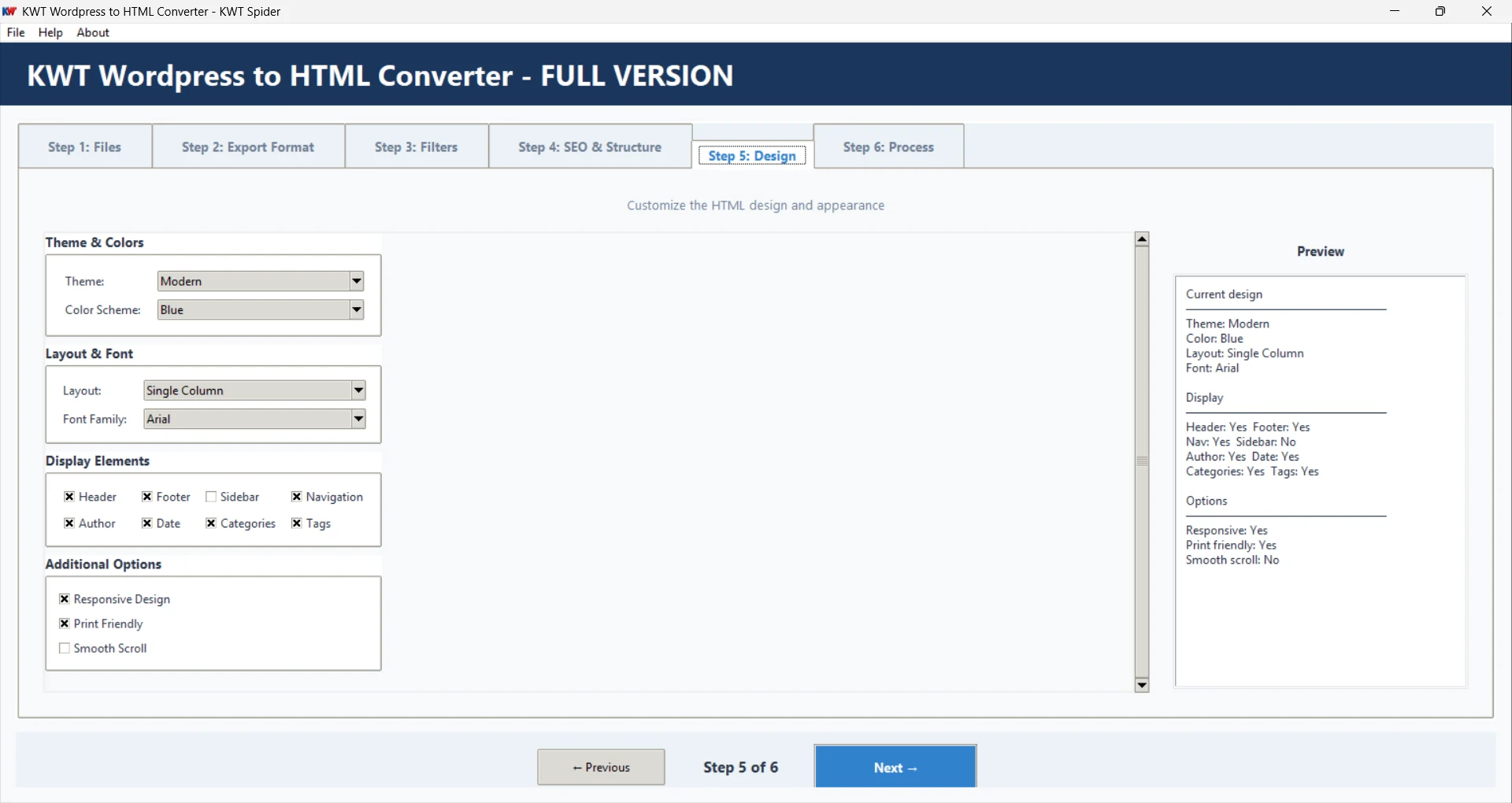
Allow you to choose layout,theme,footer,navigation,sidebar,header,color scheme,font,and print-friendly styles.
Start conversion
After analysis of the uploaded data,It starts merging data,applies filtration,removes duplicates,generates the index page,and shows a summary with conversion statistics.
Why Should You Use the Converter?
It is a well-suitable program for:
Saving Hosting Costs
With conversion of WordPress into static HTML,it lets you host the website for free or affordable static hosting (Netlify,Vercel).
Better performance
Static HTML websites perform smoothly. It loads faster,requires no database or PHP. With pure HTML served from CDN,it saves load time.
Security
Static sites have no database or PHP. Thus,there is no or minimal chances of attacking surface compared to WordPress.
Backup &Archive
It lets you create permanent HTML of WordPress content that works smoothly and independently of WordPress.
Benefits over manual conversion
It saves time by converting hundreds of pages within a few minutes. It ensures quality by preserving formatting,metadata,design and structure). The SEO features will be intact by making no changes in meta tags and structure. In addition,the tool needs no coding with simple GUI.
How does It Work
Here the six steps the tool requires you to follow:
In this section,select XML and SQL files. It requires selecting at least one file. Next,select a local folder for output.
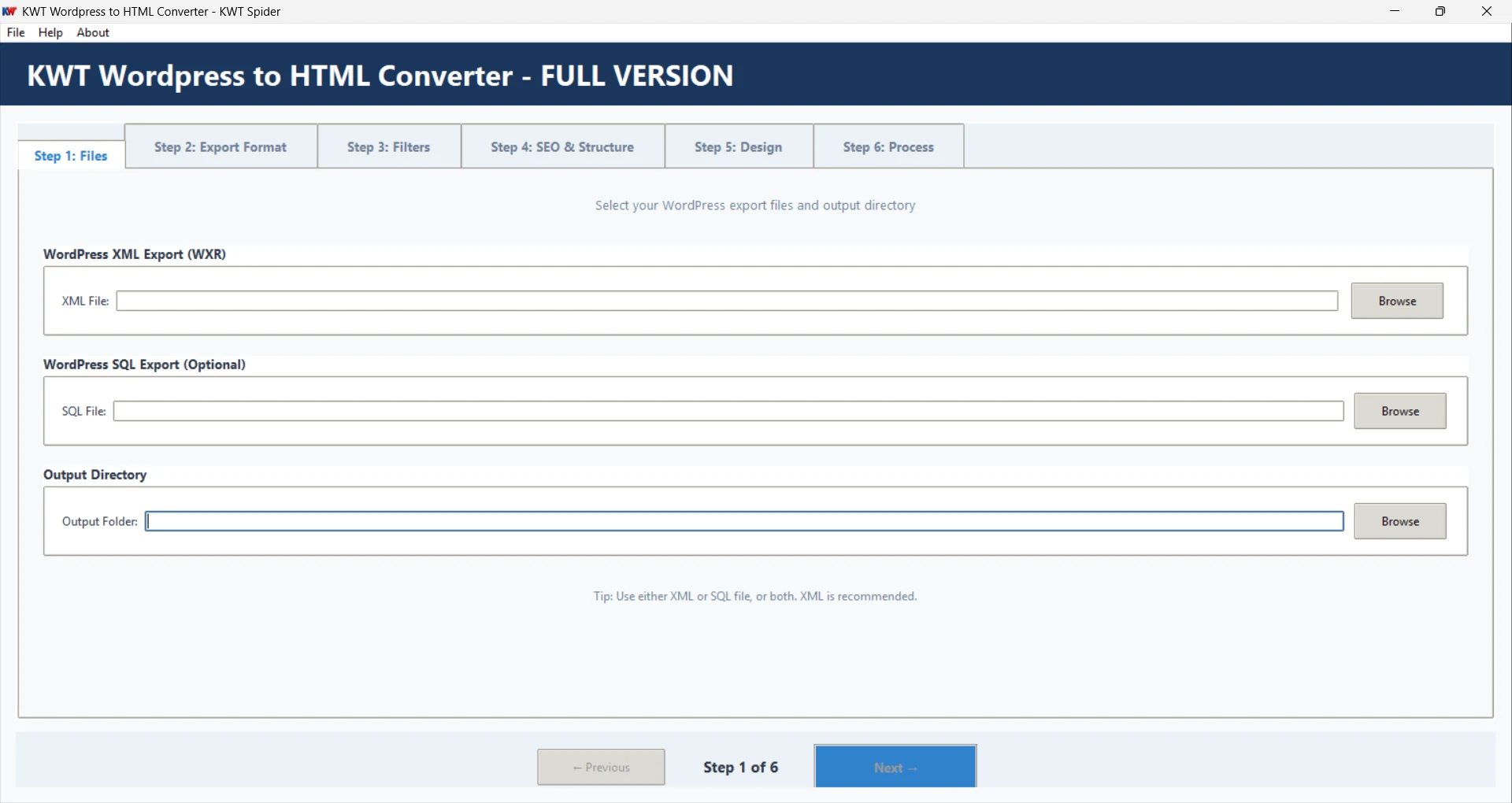
It has 3 options to choose—HTML,Markdown,and JSON with additional options—include images,preserve format,and create index page.
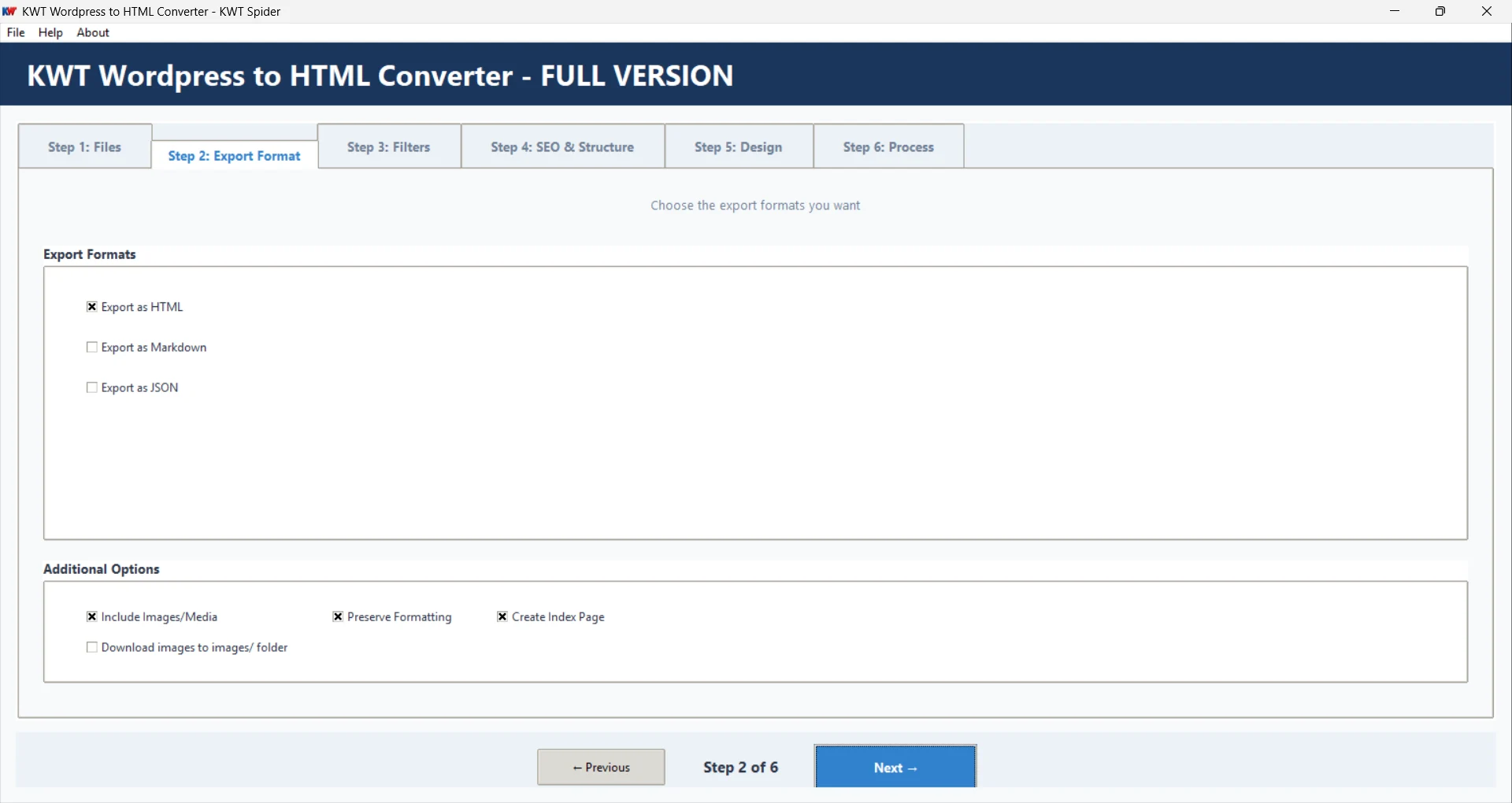
It lets you choose post types,post status,and additional filtration.
It allows you to include meta tags like Base URL,Site description,and site name with keeping the folder structure intact like URL-based folder structure or create nested folders from post URLs.
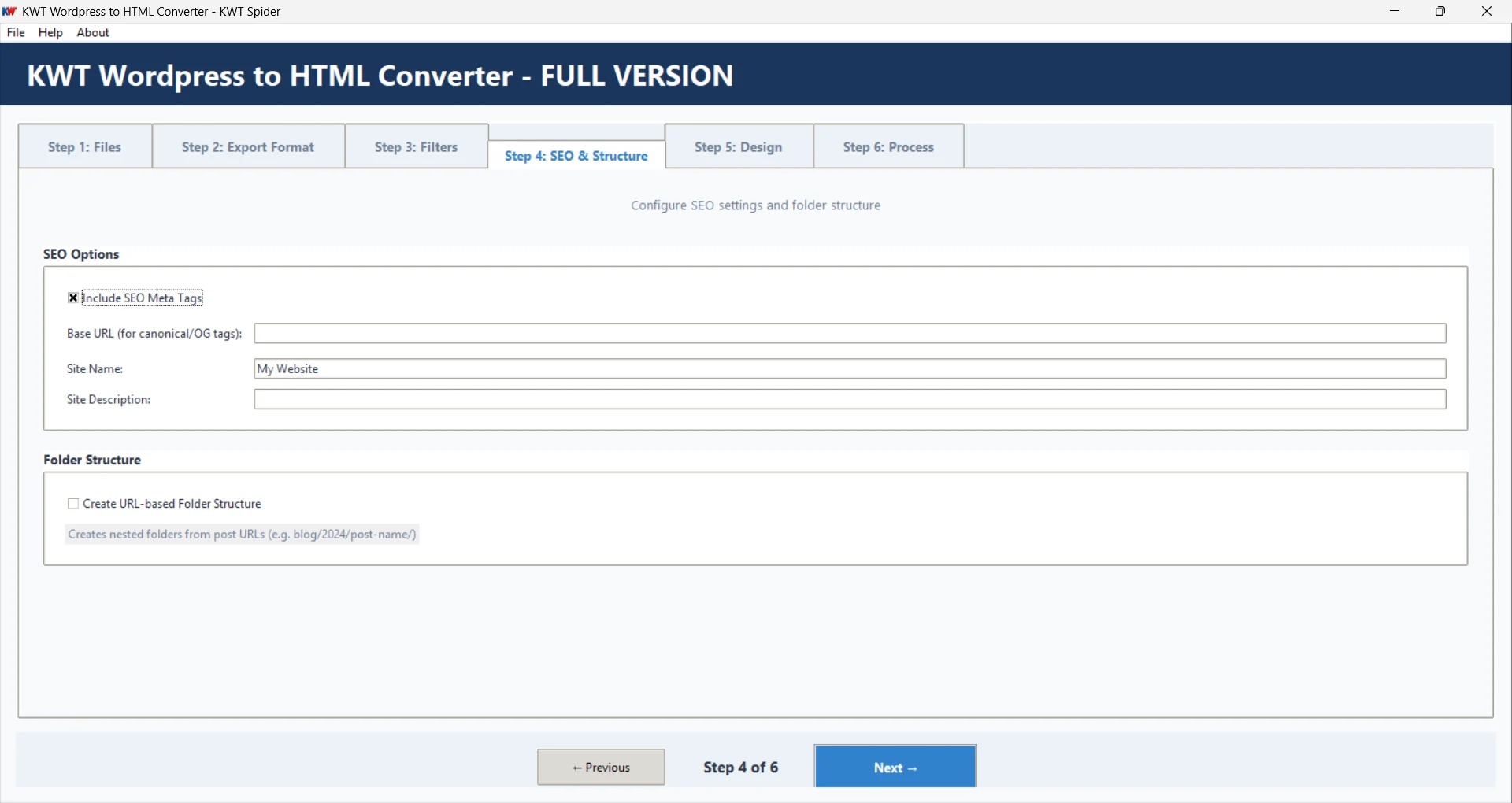
This optional feature offers to select themes,layout,display elements,responsive design,print friendly,and smooth scroll. It generates preview of the changes.
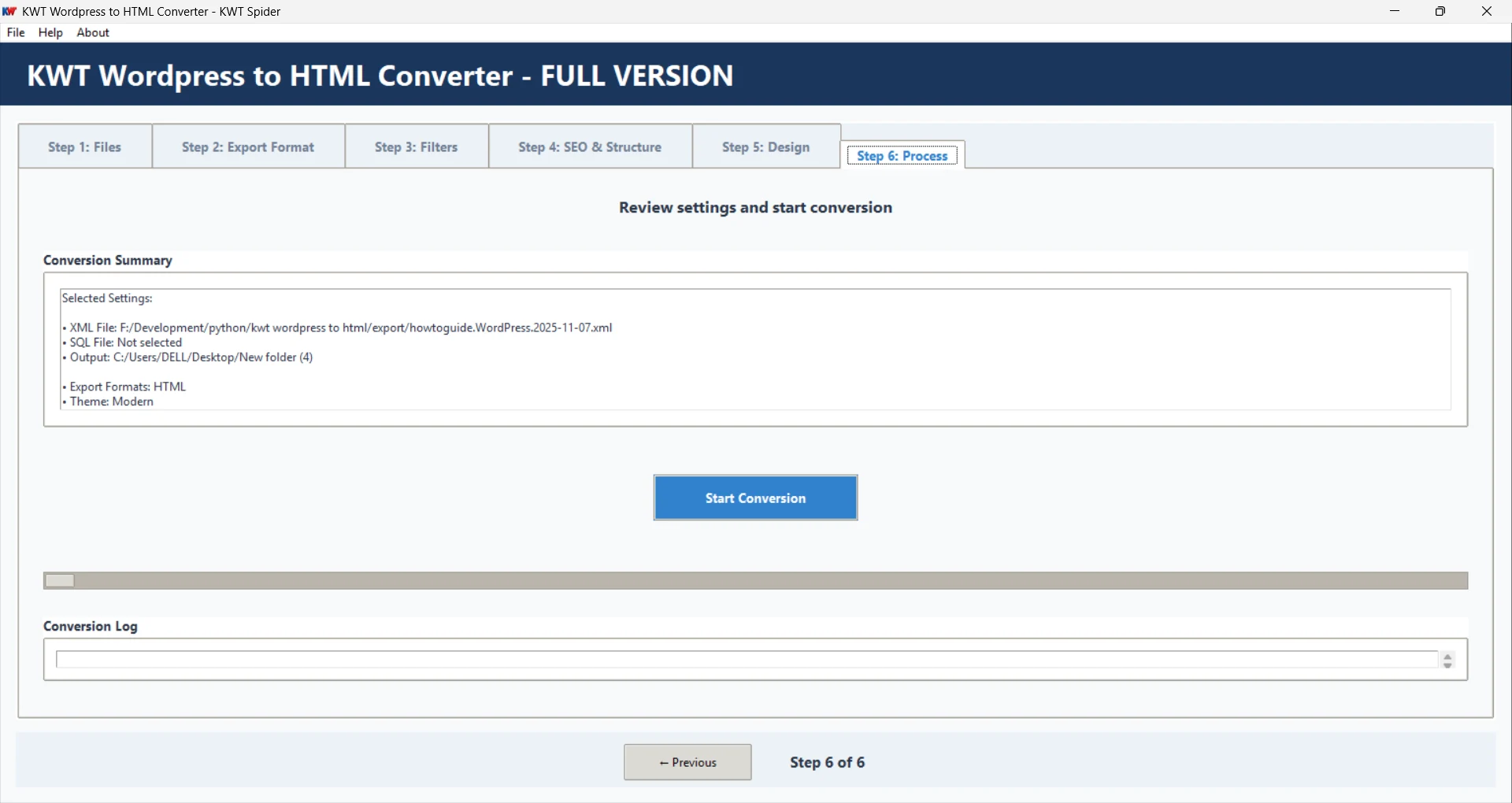
The last phase provides conversion summary,sets the conversion log,and finally,press the "Conversion" button to complete the process.
Features (Full List)
Providing complete features of KWT WordPress app.
Input &output
- WordPress XML (WXR) and SQL support
- Export to HTML,Markdown,JSON
- Smart duplicate detection (XML precedence)
- URL-based folder structure
- Index page generation
Design
- 8 color schemes
- 7 themes
- Layout options (Single Column,Two Column,Wide)
- Responsive and print-friendly styles
- Font and display toggles
Filters &options
- Status (published,draft)
- Post type (post,page,custom)
- Include images,preserve formatting
- Content length and empty exclude
SEO &structure
- SEO meta tags
- Canonical URLs,site name,base URL
- Open Graph,Twitter Cards
- URL-based nested folders
Images &UI
- Download images to images/folder
- Standalone EXE,no installation
- Offline-ready HTML with local paths
- Progress tracking and error handling
- 6-step wizard,real-time validation
Demo Version vs Full Version
All features are available in both versions. The only difference is how many posts/pages you can convert.
| Feature | Demo | Full |
|---|---|---|
| Posts/pages conversion | Limited to 10 | Unlimited |
| Export formats | HTML,Markdown,JSON | HTML,Markdown,JSON |
| Themes &design | All available | All available |
| SEO,filters,images | Full support | Full support |
| License | Not required | Required (activate in About) |
| Price | Free | Paid |
Activate full version:Open the app → About → Activate License → Enter your license key → Activate. Product &support:kwtspider.com/wordpress-to-html· info@kwtspider.com
Download KWT WordPress to HTML Converter
Download and run the converter. No installation—standalone EXE,double-click and go. Your WordPress exports and converted files stay on your PC.
- OS:Windows 10/11 (or Windows 7/8)
- Installation:None – portable exe,run from any folder
- Input:WordPress XML (WXR) and/or SQL export – at least one required
v1.0 · Demo free (10 posts) · Full version paid
FAQs
Common questions related KWT WordPress: